Inventory guides
Simple food truck inventory, on iPhone or a free sheet
To keep food truck inventory by hand, record what goes on the truck, count it at close and write off waste, in a simple stock app or a spreadsheet. If every sale has to deduct ingredients and show cost per taco, you need a restaurant system tied to your POS instead. Countstead is a general small-business inventory app for iPhone and iPad, and it suits a truck that counts by hand. The free sheet below works without it.
For owner-operators of US food trucks and carts who count stock by hand, including Mexican taco trucks and Arab or Middle Eastern shawarma, falafel and halal trucks. Countstead records what you enter. It doesn’t read sales from a POS, deduct ingredients through recipes, or work out food cost.
Download Countstead for iPhone or iPadDownload the free sheet (.xlsx)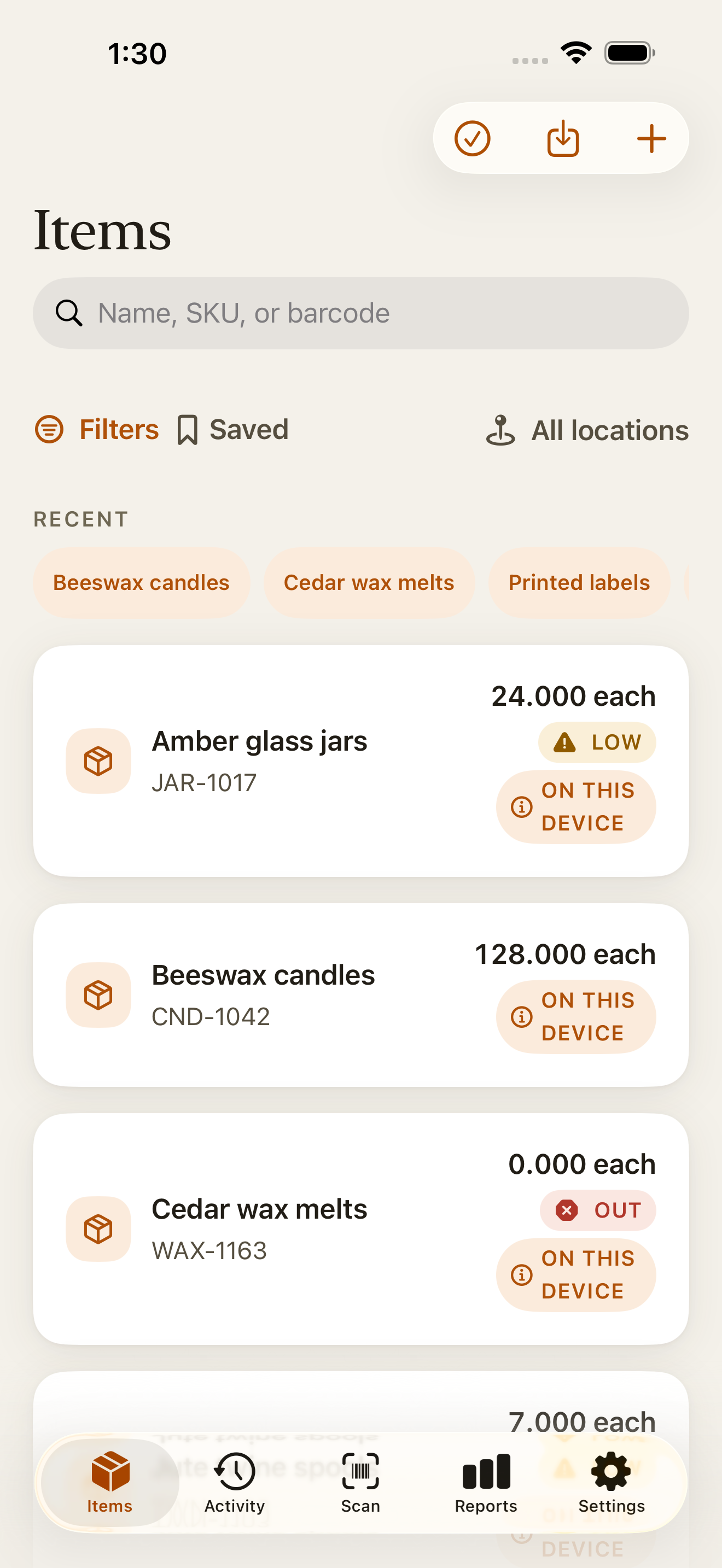
Which tool fits your truck
Food truck inventory is the record of what stock is on the truck, what is in the commissary or other storage, and what was used or thrown away in a shift. Which tool fits depends on whether each sale has to deduct ingredients on its own.
That only works once every menu item has a recipe in a system connected to your POS, so take that route if you’ll keep those recipes up to date. If you count by hand, a simple app or sheet tells you what you have and what to load.
| What you need | What fits |
|---|---|
| Know what’s on the truck, what’s low and what was wasted | A simple stock app such as Countstead, or the free sheet. |
| Truck and commissary as separate balances | Countstead with more than one location, which requires Countstead Pro, or the free sheet. |
| Every sale deducts ingredients and shows cost per taco | A restaurant system tied to your POS. Countstead doesn’t do this. |
| A separate login for each person | Countstead doesn’t have them. If you need individual logins, look for a system that has them. |
Track the truck and the commissary
A commissary is the kitchen or storage space you load the truck from. Rules on when you need one vary by city and county, so check with your health department. As of November 2026, New York City says carts and trucks must be cleaned, serviced and stored at a Health Department approved facility, such as a commissary or depot, and Los Angeles County says all mobile food facilities shall operate out of a commissary, mobile support unit or other approved facility. In Countstead you can run the two places as one total or as two locations.
In setup, choose Food and drink, the closest match. Countstead suggests kilograms as the unit and names your first location Dry store; you can change both.
One location is free. Count everything, truck and commissary together, as one total. Loading the truck needs no entry, because the stock stays in that total. Remove what you sell or throw away, and count both places at close.
Two locations require Countstead Pro: one called Commissary and one called Truck, with a Transfer before you leave. Transfers don’t change the total, because they only move stock between the two. Sale and Waste take stock out, so they do. With All locations selected, the Items list shows each item’s total.
Set up the two locations
In Settings → Locations, name your first location Commissary and add one called Truck. On each item’s screen, add the item to the second location, where it starts at zero.
Transfer before you leave
Open the item and tap Transfer. Set From to Commissary and To to Truck, enter what you’re loading, and tap Save transfer.
Record sales and waste at the truck
With Location set to Truck, tap Remove stock, enter the quantity, choose Sale or Waste, and tap Save.
| Moment | Commissary | Truck | Total |
|---|---|---|---|
| Start of the day | 20 | 4 | 24 |
| Transfer 8 to the truck | 12 | 12 | 24 |
| Remove 9 at the truck, reason Sale | 12 | 3 | 15 |
| Closing count on the truck: 3, which matches | 12 | 3 | 15 |
Count at close: an end-of-shift routine
Record waste before you count. The closing count then covers only what’s left, and the balance and the count can match.
Write off waste
Open the item, tap Remove stock, enter the quantity, choose a reason such as Spoiled or Waste, and tap Save. The Waste and loss card in Reports adds up the last 30 days by reason.
Take the closing count
With Location set to Truck, tap Count and enter what’s actually there. The count joins the item’s history, so the earlier entries stay visible. If it differs from the balance, look for a missed sale or waste entry first.
See what’s low
Give each item a Low-stock level on its screen. At that level or below, the item appears in the Low Stock view in Reports.
Work out tomorrow’s load
For each item, subtract the closing count from how much you want on the truck. In Countstead you do this sum yourself; the free sheet’s Load tomorrow column does it for you.
Date what you prepped
For prepped items such as salsa and toum, tap Best before on the item’s screen and enter the date you’ve decided on. Countstead records that date; it doesn’t judge how long food keeps.
A Mexican food truck starter list (taco truck)
Edit this list to your menu. It isn’t advice on what or how much to stock. It has 25 items. Countstead is free for up to 30 active items at one location, so the list fits with room for five more.
Units such as lb, qt, gal, bunch and tank aren’t in the app’s presets, so type them as your own unit when you add the item. Quantities take decimals, so an open container of salsa can be 2.5 qt.
| Item | Unit |
|---|---|
| Corn tortillas | pack |
| Flour tortillas | pack |
| Carne asada | lb |
| Al pastor | lb |
| Pollo | lb |
| Carnitas | lb |
| Chorizo | lb |
| White onions | lb |
| Cilantro | bunch |
| Limes | each |
| Tomatoes | lb |
| Avocados | each |
| Jalapeños | lb |
| Queso fresco | lb |
| Crema | tub |
| Salsa roja | qt |
| Salsa verde | qt |
| Rice | lb |
| Beans | lb |
| Cooking oil | gal |
| Foil | roll |
| Taco trays | case |
| Napkins | pack |
| Bottled drinks | case |
| Propane | tank |
An Arab and Middle Eastern food truck starter list
This list suits a shawarma, falafel or halal truck; edit it to your menu too. It also has 25 items, so it fits the free limit of 30 active items at one location, with room for five more. Type units such as lb, qt, gal and bunch as your own unit, as with the list above.
Countstead records the name you give an item; it doesn’t check or certify halal status.
| Item | Unit |
|---|---|
| Halal chicken | lb |
| Halal beef | lb |
| Halal lamb | lb |
| Falafel mix | lb |
| Pita | pack |
| Flatbread | pack |
| Rice | lb |
| Hummus | tub |
| Tahini | tub |
| Toum (garlic sauce) | qt |
| Pickles | jar |
| Pickled turnips | jar |
| Tomatoes | lb |
| Cucumbers | lb |
| Onions | lb |
| Parsley | bunch |
| Lettuce | head |
| Lemons | each |
| Shawarma spice mix | lb |
| Cooking oil | gal |
| Foil | roll |
| Takeout containers | case |
| Napkins | pack |
| Bottled drinks | case |
| Propane | tank |
The free food truck inventory sheet (Excel template)
The free sheet is an Excel workbook (.xlsx) for counting each day, with no macros and no sign-up. It has four sheets: Example day, with made-up numbers; Taco truck and Shawarma truck, which hold the two lists above with the counts blank and 15 spare rows; and How to use.
Each row is one item. Type in the white cells: Truck par, which is how much of the item you want on the truck when you leave, then Opening on truck, Loaded, Waste, Closing count and In commissary now.
The shaded columns work themselves out. Used is opening plus loaded, minus waste, minus closing. Load tomorrow is par minus closing, and never goes below 0. Flag shows Check count when Used is below zero, and otherwise shows Buy more when Load tomorrow is more than what’s in the commissary.
For the next day, copy each Closing count into Opening on truck and clear the rest of the day’s numbers. In Numbers, choose Table > Header Rows > 1 before you sort, or the column names are sorted with the rest.
In Google Sheets (File > Import) and Numbers 15.1, every formula and highlight kept working, and the results updated when a number changed. The file hasn’t been opened in Excel.
This sheet is for daily counting. To bring an item list into Countstead, start from the inventory spreadsheet template and follow the import guide.
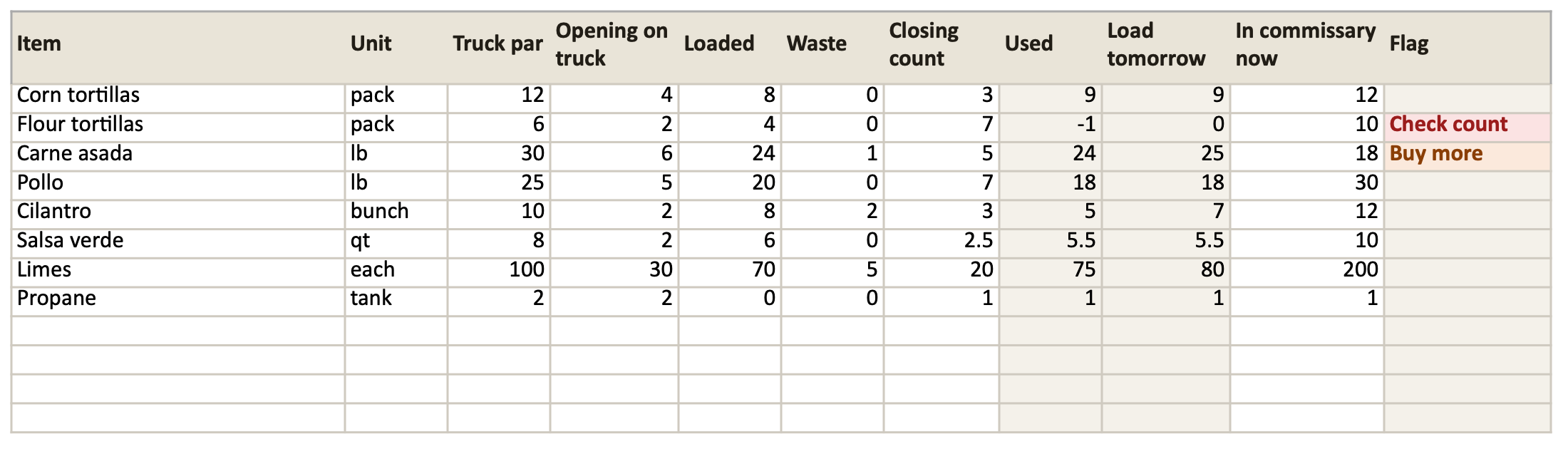
| Item | Used | Load tomorrow | Flag |
|---|---|---|---|
| Corn tortillas (pack) | 4 + 8 − 0 − 3 = 9 | 12 − 3 = 9 | None: 12 in the commissary covers 9 |
| Flour tortillas (pack) | 2 + 4 − 0 − 7 = −1 | 6 − 7 is below zero, so 0 | Check count: the closing count is more than the day’s numbers allow |
| Carne asada (lb) | 6 + 24 − 1 − 5 = 24 | 30 − 5 = 25 | Buy more: 25 is more than the 18 in the commissary |
| Pollo (lb) | 5 + 20 − 0 − 7 = 18 | 25 − 7 = 18 | None: 30 in the commissary covers 18 |
| Cilantro (bunch) | 2 + 8 − 2 − 3 = 5 | 10 − 3 = 7 | None: 12 in the commissary covers 7 |
| Salsa verde (qt) | 2 + 6 − 0 − 2.5 = 5.5 | 8 − 2.5 = 5.5 | None: 10 in the commissary covers 5.5 |
| Limes (each) | 30 + 70 − 5 − 20 = 75 | 100 − 20 = 80 | None: 200 in the commissary covers 80 |
| Propane (tank) | 2 + 0 − 0 − 1 = 1 | 2 − 1 = 1 | None: 1 in the commissary covers 1 |
Common questions
- What inventory app should I use for my food truck?
- It depends on whether each sale has to deduct ingredients. If it does, choose a restaurant system tied to your POS. If you count stock by hand and want to see what’s on the truck, what’s low and what was wasted, a simple stock app such as Countstead, or the free sheet, is enough.
- Is there a simple iPhone app for a Mexican food truck or taco truck?
- Countstead is a general small-business inventory app for iPhone and iPad, and it suits a taco truck that counts by hand. Type units such as lb and qt, count at close and record waste. It’s free for up to 30 active items at one location, and the starter list has 25.
- Does it work for an Arab, halal or shawarma truck?
- Yes, as a general stock app. Add items such as halal chicken, pita and toum in the units you buy them in, starting from the list on this page. Countstead records the name you give an item; it doesn’t check or certify halal status.
- How do I track stock between the commissary and the truck?
- In Countstead, set up Commissary and Truck as two locations, which requires Countstead Pro, and Transfer what you load before you leave. A transfer doesn’t change the total; Sale and Waste do. With one location, count both places as one total. The free sheet tracks both in columns.
- Can it deduct ingredients when I sell a taco?
- No. Countstead has no recipes and doesn’t read sales from a POS, so selling a taco takes nothing off the count. Record what you sell or waste yourself, and count at close. If each sale has to deduct ingredients, choose a restaurant system tied to your POS.
- Does it work with no signal at an event?
- Yes. Countstead keeps your inventory on the iPhone or iPad, and counts, transfers and stock you remove all save with no connection. No account is needed for local use.
- Is there a free food truck inventory spreadsheet or template?
- Yes. The sheet on this page is a free Excel workbook (.xlsx) with no sign-up: an example day, a taco truck list and a shawarma truck list, with Used, Load tomorrow and Flag worked out for you. Tested in Google Sheets and Numbers 15.1; not opened in Excel.
- Is the app in Spanish or Arabic?
- Spanish, yes. Arabic, no. The app is available in English, German, French, Spanish, Italian, Portuguese (Brazil), Japanese, Korean and Indonesian, and you choose the language in Settings. This page and the free sheet are in English.
Try the inventory demo
Add an item and record stock movements in the browser. The demo is a working example; camera scanning is simulated.
Try the inventory demoAbout this guide
Written by Imdad Ismail, an independent developer in Sri Lanka who makes Countstead. Where a guide gives steps in Countstead, they match the version on the App Store. To report a mistake, email [email protected].