Inventory tracker for small businesses
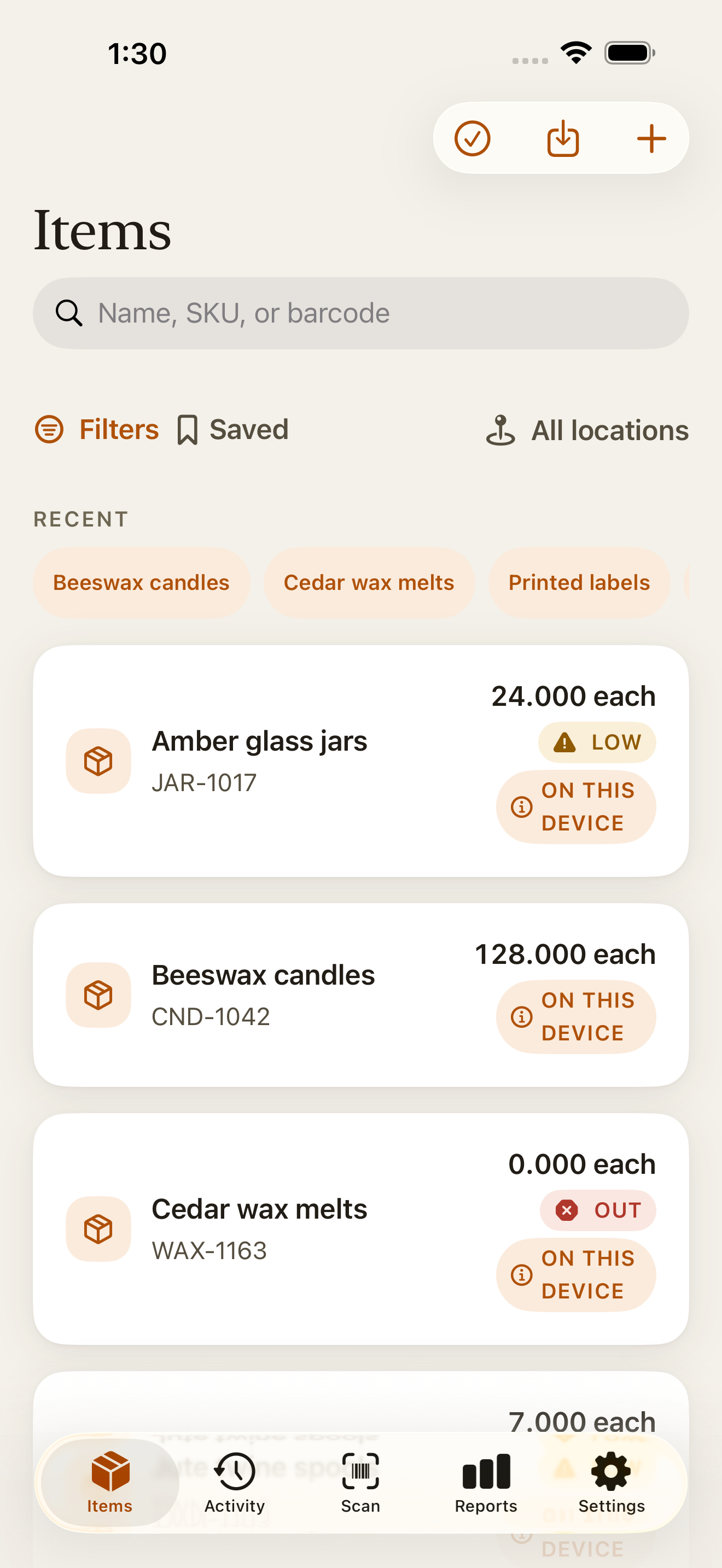
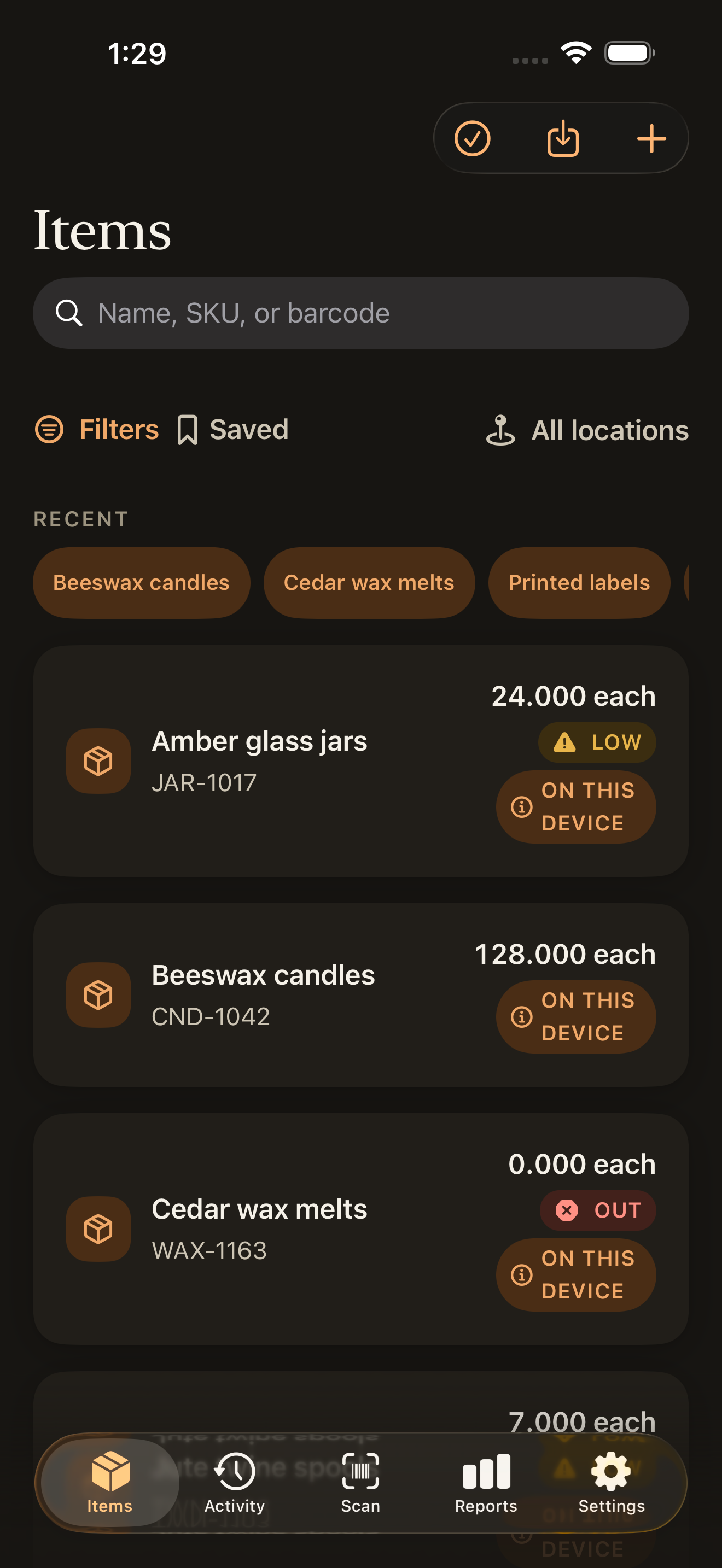
Countstead is an inventory app for iPhone and iPad. Know what you have, where it is, and what is running low. Scan barcodes, record stock movements, and keep your inventory on your device. No account is needed for local use.
- Works offline
- Count stock without a connection.
- Scan your items
- Find an item by its barcode.
- Keep your data
- Export your inventory as CSV.
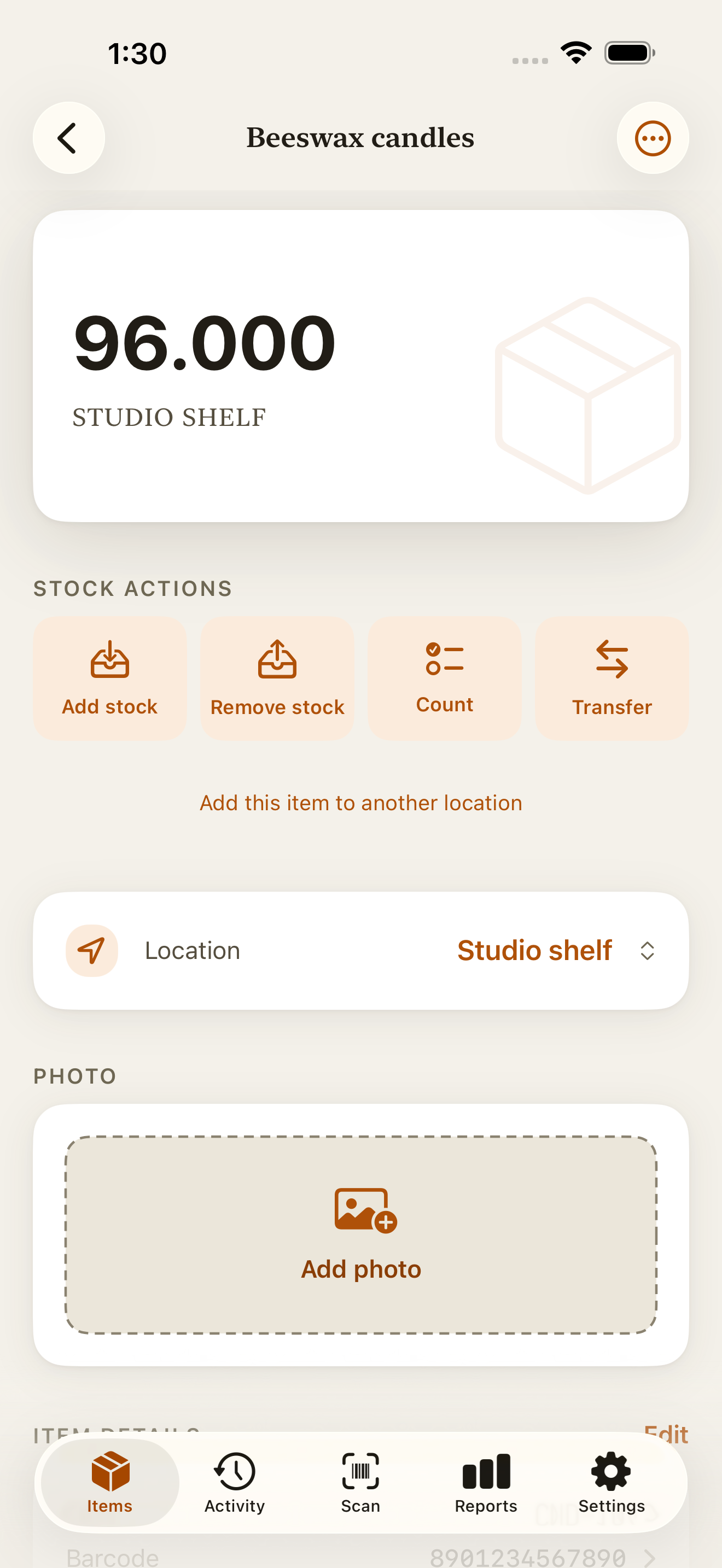
The event types Countstead records
How it works
Four moves, and the ledger keeps itself.
- 01
Add an item, or scan one in
Type a name and an opening count, or point the camera at a barcode to find an item you already track. Countstead reads the code on your device; it does not look anything up online.
- 02
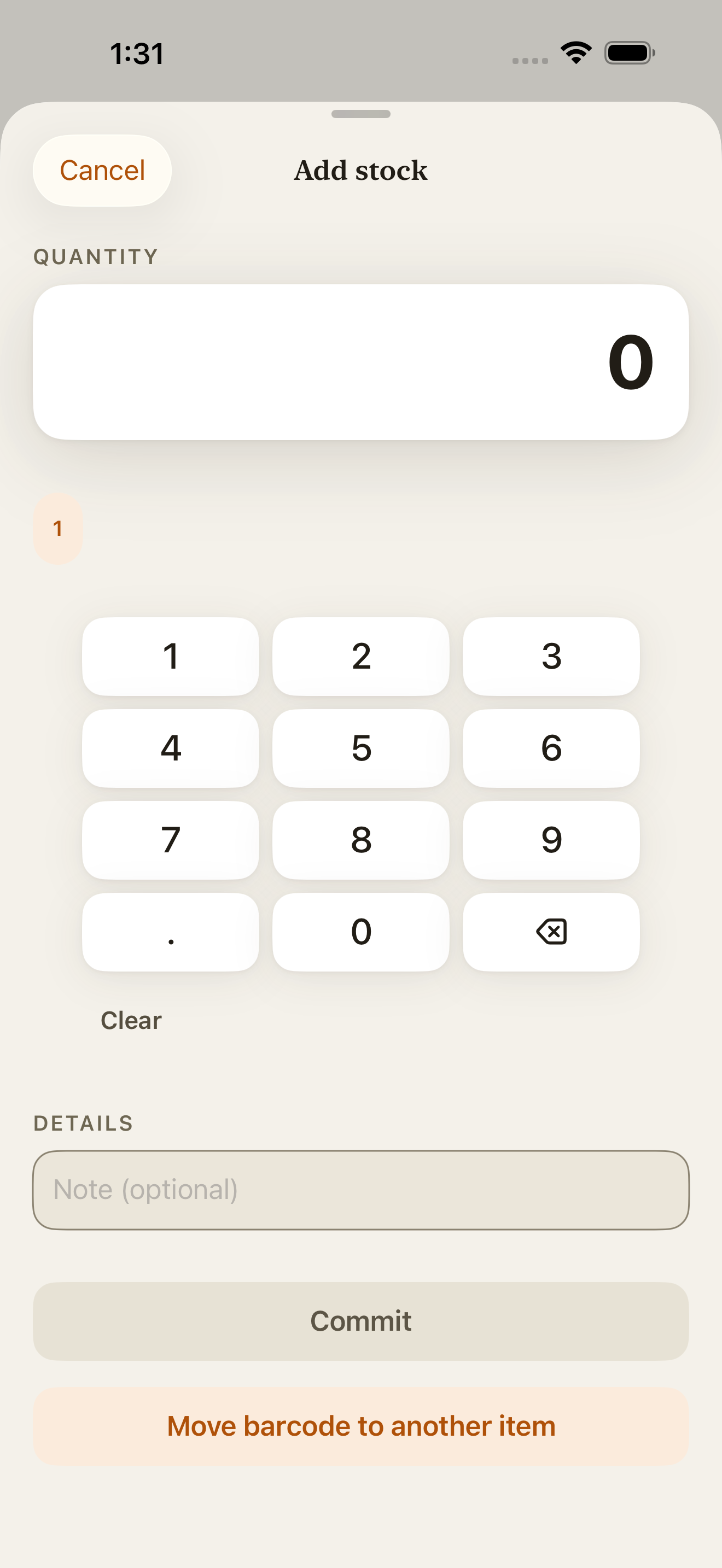
Record stock in, stock out, or a recount
Three taps. Every movement is written once and never rewritten. A correction adds a compensating event, so the original entry stays visible.
Stocktake checklist and count sheetWhen a count doesn’t matchSet up cycle counting
- 03
Find anything as you type
Search runs across your items while you type. Scanning a code jumps straight to the matching item.
- 04
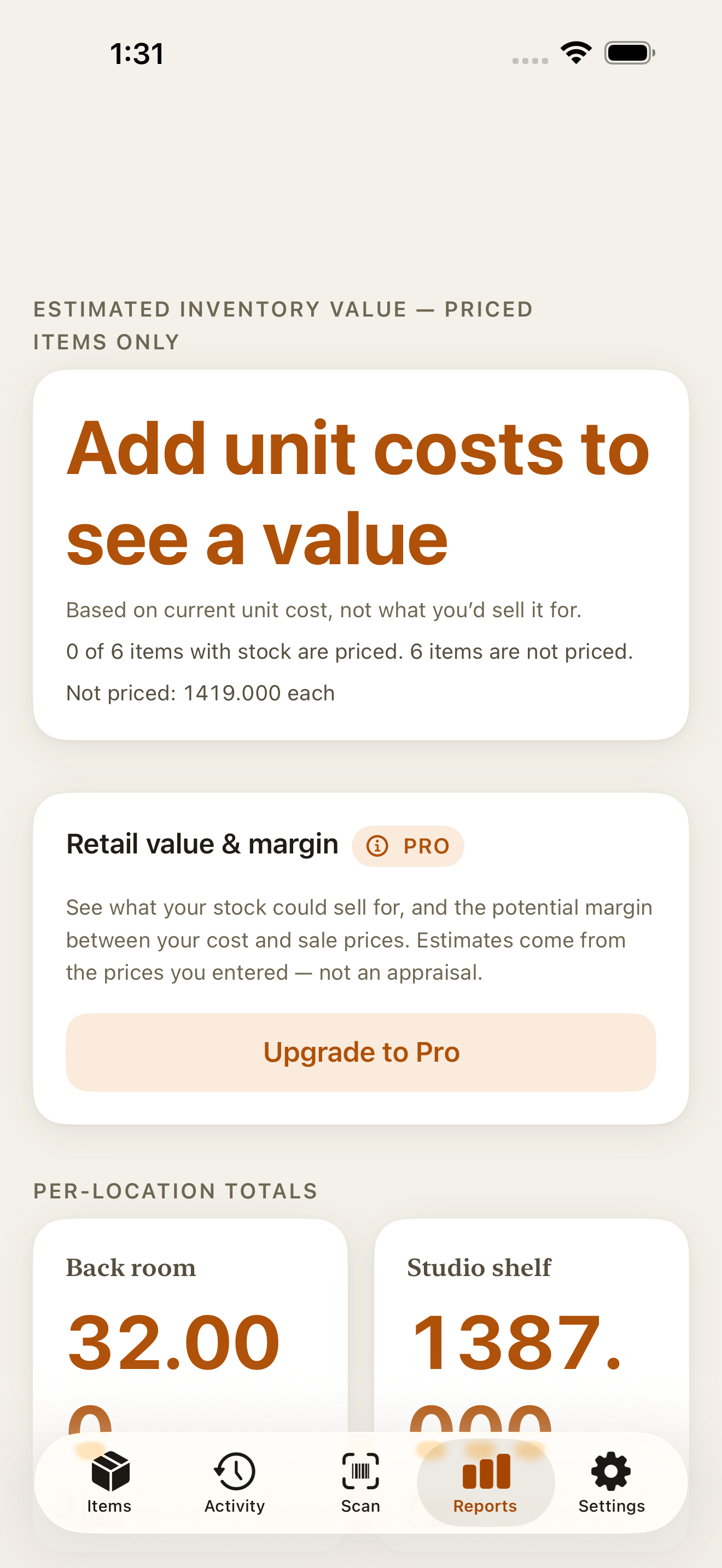
See what is running low, per location
Choose a low-stock threshold for each item and location. The free Low Stock view in Reports shows balances at or below it. Countstead Pro can send a local alert on this device when alerts are enabled.
What it does
Built to be trusted with the count.
Offline-first by design
Your workspace lives in a local database on the device. Everything works with no connection, and your inventory stays on the device unless you turn on sync.
Barcode and QR scanning
Scan a code to find an item you already track, or to prefill a new one. Codes are read on device, against your own items.
See the barcode inventory guideHistory you can trust
Seven event types, appended and never edited. Corrections add a compensating event rather than rewriting the past.
Stock by location
Balances and history are tracked per location, so the count you see is the count in that place. More than one location is part of Countstead Pro.
See a studio-to-market example-
Low-stock thresholds
Set a threshold of 12 units: a balance of 12 or fewer at that location appears in Low Stock. At 13, it stays off the list. Countstead Pro adds optional local alerts on this device.
Calculate a low-stock threshold Export that stays yours
A full CSV package covering items, locations, balances, events, transfers and activity, with a manifest describing the set.
Try it
Try the core loop
A small working model of Countstead, running entirely in this page. Nothing is saved and nothing is sent anywhere.
Add an item. Give it a name, an opening count, and a low-stock threshold.
Record stock coming in. Pick the item, choose stock in, and enter a quantity.
Find it. Start typing part of the name.
Now take stock out until the balance reaches the threshold.
That is the loop. Every movement is still in the history below; nothing was overwritten.
Items
On this deviceNo items yet. Add one to start the loop.
Illustrative. Scanning here is simulated; in the app the camera reads the code on your device.
Countstead in numbers
- 10,000
- rows in a single CSV import
- 3
- decimal places for fractional quantities
- 1
- photo per item, up to 1600 pixels
- 7
- immutable event types
Privacy and ownership
Inventory that lives on your device.
No account is required to use Countstead locally. Your items, counts, and history are stored in a local database on your iPhone or iPad, protected by iOS data protection.
Your inventory stays on the device unless you turn on sync, and scanning never queries a product database. The app does send usage events to TelemetryDeck, but they never include your inventory content. You can turn them off in Settings → Privacy.
Optional cloud sync is part of Countstead Pro. It uses Countstead’s own operator-hosted service, which stores data on servers in Europe. It is something you turn on, not something that is on.
And if you ever want out, the full CSV export is one action away.
Where it fits
Between a spreadsheet and a system you have to implement.
| Aspect | Spreadsheet | Countstead | ERP or WMS suite |
|---|---|---|---|
| Setup effort | Minutes, then it grows into a second job | Minutes | Weeks, often with a consultant |
| Works with no connection | Depends on the tool | Yes, fully | Rarely |
| Stock per location | Manual columns you maintain by hand | Tracked per location | Yes |
| Audit history | Whatever the undo stack remembers | Every movement, appended and never rewritten | Yes |
| Getting your data out | Yes | A full CSV package, whenever you want it | Usually, with effort |
| Built for | Anything | Small businesses | Larger organizations |
A spreadsheet is enough while stock changes rarely and you update it at a desk. Countstead fits when stock moves every day, you count away from a desk or a connection, and you want a history you can check. An ERP or WMS suite fits larger organizations that can give its setup several weeks.
Compare a spreadsheet with an inventory appCompare Countstead with SortlyCompare Countstead with BoxHeroInventory for cafés and small kitchens
Your data
Bring your list in. Take everything out.
CSV import, up to 10,000 rows
Map your columns, preview what will happen, then commit. The import is applied as one unit: either all of it lands or none of it does.
Import inventory from ExcelA complete export package
Items, locations, per-location balances, stock events, transfers and activity, plus a manifest describing the set. Free, and always the whole workspace.
Reports for a scope you choose
Countstead Pro adds a filtered CSV report and a PDF inventory summary for the items and locations you pick. Both are documents to read, print or send on; the free CSV package stays the way you take everything with you.
iPhone first, iPad supported.
Countstead runs on iOS and iPadOS 17 or later. The app supports English, German, French, Spanish, Italian, Portuguese (Brazil), Japanese, Korean, and Indonesian. Choose your language in Settings.
Countstead is made by Imdad Ismail, an independent developer in Sri Lanka, and is available on the App Store. Start with your inventory on this device, with no account required.
Questions
Countstead in brief
- What it is
- An inventory app for small businesses that keep physical stock
- Runs on
- iPhone and iPad, with iOS or iPadOS 17 or later. There is no Android, Windows or web version.
- Cost
- Free to download and use for up to 30 active items at one location. Countstead Pro is an optional in-app subscription.
- Works offline
- Yes. Every core action works with no connection.
- Account
- None for local use. Sync between your devices is part of Countstead Pro and uses Sign in with Apple.
- Barcodes
- Barcode and QR code scanning with the camera, read on the device
- Spreadsheets
- CSV import of up to 10,000 rows, and a free CSV export of the whole workspace
- Languages
- English, German, French, Spanish, Italian, Portuguese (Brazil), Japanese, Korean and Indonesian
- Backups
- Free snapshots of the whole inventory, saved on this device and restorable on this device or another one. Countstead Pro adds automatic daily backups on this device.
- Made by
- Imdad Ismail, an independent developer in Sri Lanka
- App Store name
- Countstead: Inventory Tracker
- What is Countstead?
- Countstead is an inventory app for iPhone and iPad, made for small businesses. It records stock in, stock out, and counts, scans barcodes on the device, and works with no connection. It is on the App Store as Countstead: Inventory Tracker.
- Is Countstead free?
- Countstead is free to download and to use for up to 30 active items at one location. The free app includes barcode scanning, the full stock history, the Low Stock view and the full CSV export. Countstead Pro, an optional in-app subscription, is for more items or more than one location.
- Who is Countstead for?
- Countstead is for small businesses that keep physical stock, such as shops, makers and craft sellers, and resellers. It fits when stock moves every day and gets counted on the shop floor or in a storeroom, away from a desk or a connection. For larger organizations that can spend several weeks setting up a system, an ERP or WMS suite fits better.
- Does it work offline, and do I need an account?
- It works fully offline, and local use needs no account. Your workspace is a local database on the device, and every core action works with no connection.
- Is Countstead available for Android or the web?
- No. Countstead runs only on iPhone and iPad, with iOS or iPadOS 17 or later, and you download it from the App Store. There is no Android, Windows or web version.
- Can Countstead scan barcodes?
- Yes. Countstead scans barcodes and QR codes with the camera of your iPhone or iPad. It reads the code on the device and matches it against your own items, so scanning works offline and never looks a code up in an online product database. Scanning a code you have not used yet prefills a new item.
- Can I bring in my spreadsheet?
- Yes, as CSV, up to 10,000 data rows per import. You match the columns, preview the result, and confirm it as a single unit, so a failed import cannot leave you half-migrated.
- Can I back up my inventory?
- Yes. A snapshot is a complete copy of your inventory: items, locations, quantities, stock history, activity and photos. Creating one is free, and it is saved on this device; share the file to keep it somewhere else. You can restore a snapshot on this device or another one, where it replaces the inventory, though an inventory that syncs can’t be replaced this way. Countstead Pro also makes automatic daily backups on this device.
- What is Countstead Pro?
- Countstead Pro is an optional in-app subscription. It removes the 30-item limit and adds more than one location, cloud sync between your devices, low-stock alerts on this device, label sheets, a PDF inventory summary, and filtered CSV reports.
- How does Countstead compare with Sortly or BoxHero?
- Countstead keeps your inventory in a local database on your iPhone or iPad and needs no account for local use. It has a comparison page for each of those apps, which sets the two side by side and gives the date each fact about the other app was checked.
- Who makes Countstead?
- Countstead is made by Imdad Ismail, an independent developer in Sri Lanka, who publishes it on the App Store. Questions go to [email protected].
Start with one item.
Add your first item with an opening count, and let the history build itself from there.