Inventory guides
Free coffee shop inventory spreadsheet template
Download a free coffee shop and café inventory spreadsheet template for Microsoft Excel, Google Sheets or Apple Numbers. It starts with 48 common café items grouped into five storage areas, a stock in and out log, par-level order numbers and low-stock flags. You don’t need to sign up, and the file has no macros. If you switch to Countstead on iPhone or iPad later, the app imports the Items sheet directly.
For independent coffee shops, cafés, bakeries and small kitchens that count stock by hand. The download is an Excel workbook (.xlsx) with four sheets and no macros. The 48 starter items are a starting point, not advice on what to stock, and the eight rows on Example week are made up.
Download the template (.xlsx)Get Countstead for iPhone or iPad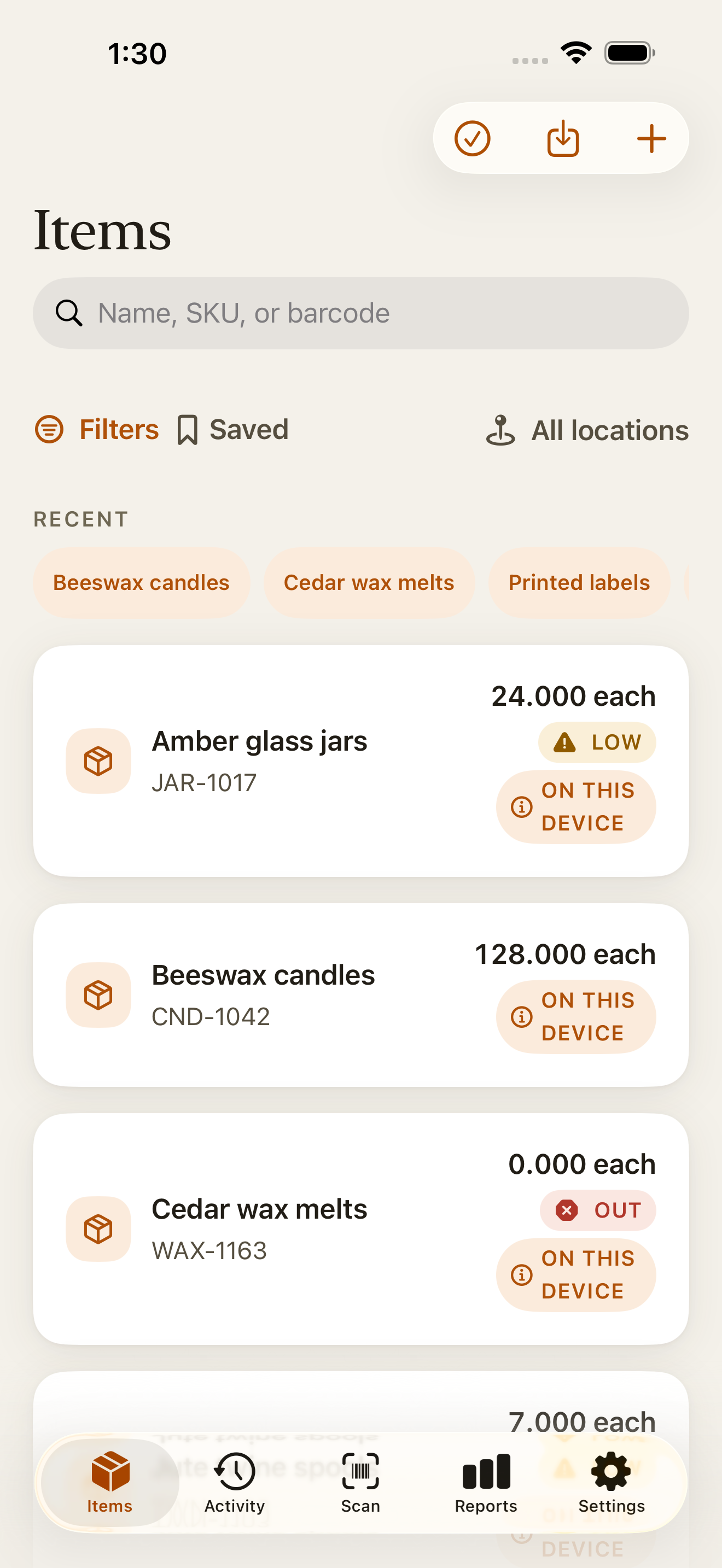
What’s in the coffee shop template
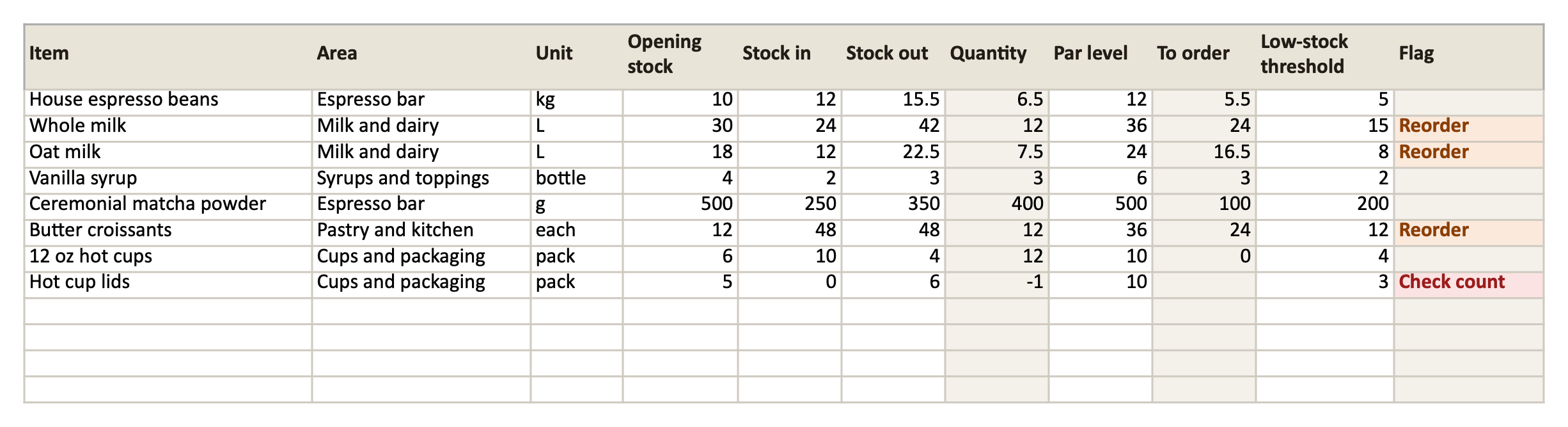
A coffee shop inventory spreadsheet template is a ready-made workbook for tracking beans, milk, syrups, pastries and cups: one row per item, a running quantity on hand, a par level for ordering and a flag when stock runs low. This workbook has four sheets. Items is the main stock list, starting with 48 café items and 252 spare rows (300 item rows). Movements is a blank log for up to 5,000 deliveries, usage entries, sales and waste, with a counter in cell G1 that warns from 4,750 rows. Example week has eight café items with made-up numbers so you can see how the formulas work before typing into Items. How to use repeats the setup steps inside the file.
Type in the white columns and leave the shaded formula columns alone. On Items, counts start blank so you can begin typing today’s stock straight away without deleting sample numbers. Stock in, Stock out, Quantity, To order and Flag update on their own once you enter an opening count or log a movement.
| Column | What goes in it | Typed or formula |
|---|---|---|
| A: Item | The name you count under, such as House espresso beans or Whole milk. | Typed in |
| B: Area | Where the item is kept in your shop, such as Espresso bar or Milk and dairy. | Typed in |
| C: SKU | Your own item code, if you use one. Formatted as text. | Typed in |
| D: Barcode | The code on the bag, box or shelf label. Formatted as text so leading zeros stay. | Typed in |
| E: Unit | What you buy or count in: kg, L, g, bottle, box, pack, tub or each. | Typed in |
| F: Opening stock | What was on hand at the start of the sheet or period. Type 0 if out of stock. | Typed in |
| G: Stock in | Deliveries and other additions logged as In on Movements for this exact item name. | Formula (SUMIFS) |
| H: Stock out | Usage, sales and waste logged as Out on Movements for this exact item name. | Formula (SUMIFS) |
| I: Quantity | Current stock on hand: opening stock plus stock in, minus stock out, rounded to 3 decimal places. | Formula |
| J: Par level | Optional target stock after a delivery. | Typed in |
| K: To order | Par level minus Quantity, never below 0, and blank if Quantity is below zero. | Formula (MAX) |
| L: Low-stock threshold | Optional level at or below which Flag shows Reorder. | Typed in |
| M: Flag | Shows Check count when Quantity is below zero, or Reorder at or below the threshold. | Formula (IF) |
| N: Notes | Optional shelf location, roaster note or open-pack reminder. | Typed in |
The 48 pre-filled café items by storage area
The Items sheet starts with 48 café items grouped into five storage areas: Espresso bar, Milk and dairy, Syrups and toppings, Pastry and kitchen, and Cups and packaging. Grouping by storage area lets you count from the bar to the fridge, dry store and cup shelves without jumping around the sheet.
Each item uses a buying or counting unit such as kg, L, g, bottle, box, pack, tub or each. Quantities support up to three decimal places, so an open bag of beans can be 2.5 kg and a half-used carton can be 0.5 L. Edit the list to match your menu: delete rows you don’t carry and add items such as retail bean bags or house syrups in the spare rows below row 49.
| Area | Item | Unit |
|---|---|---|
| Espresso bar | House espresso beans | kg |
| Espresso bar | Decaf espresso beans | kg |
| Espresso bar | Single-origin filter beans | kg |
| Espresso bar | Cold brew concentrate | L |
| Espresso bar | Ceremonial matcha powder | g |
| Espresso bar | Cocoa powder | kg |
| Espresso bar | Chai concentrate | L |
| Espresso bar | Loose-leaf black tea | g |
| Espresso bar | Loose-leaf herbal tea | g |
| Milk and dairy | Whole milk | L |
| Milk and dairy | Skim milk | L |
| Milk and dairy | Oat milk | L |
| Milk and dairy | Almond milk | L |
| Milk and dairy | Soy milk | L |
| Milk and dairy | Heavy cream | L |
| Milk and dairy | Unsalted butter | kg |
| Milk and dairy | Whipped cream chargers | box |
| Syrups and toppings | Vanilla syrup | bottle |
| Syrups and toppings | Caramel syrup | bottle |
| Syrups and toppings | Hazelnut syrup | bottle |
| Syrups and toppings | Sugar-free vanilla syrup | bottle |
| Syrups and toppings | Honey | bottle |
| Syrups and toppings | White sugar | kg |
| Syrups and toppings | Raw sugar packets | box |
| Syrups and toppings | Cinnamon powder | g |
| Syrups and toppings | Chocolate sauce | bottle |
| Pastry and kitchen | Butter croissants | each |
| Pastry and kitchen | Almond croissants | each |
| Pastry and kitchen | Pain au chocolat | each |
| Pastry and kitchen | Banana bread loaves | each |
| Pastry and kitchen | Blueberry muffins | each |
| Pastry and kitchen | Plain bagels | pack |
| Pastry and kitchen | Cream cheese | tub |
| Pastry and kitchen | Sourdough loaves | each |
| Pastry and kitchen | Eggs | each |
| Pastry and kitchen | Granola | kg |
| Cups and packaging | 8 oz hot cups | pack |
| Cups and packaging | 12 oz hot cups | pack |
| Cups and packaging | 16 oz hot cups | pack |
| Cups and packaging | Hot cup lids | pack |
| Cups and packaging | 12 oz cold cups | pack |
| Cups and packaging | 16 oz cold cups | pack |
| Cups and packaging | Cold cup lids | pack |
| Cups and packaging | Cup sleeves | pack |
| Cups and packaging | Straws | pack |
| Cups and packaging | Napkins | pack |
| Cups and packaging | Pastry bags | pack |
| Cups and packaging | Takeaway cup carriers | pack |
A worked coffee-shop week, row by row
Example week uses eight made-up café items so you can check the formulas before typing your own counts. Whole milk (12 L) and Oat milk (7.5 L) fall below their thresholds, so Flag shows Reorder. Butter croissants land right on their threshold of 12 and show Reorder too, because the rule fires at or below the threshold.
On 12 oz hot cups, 12 packs on hand against a par level of 10 leaves To order at 0. Hot cup lids end at −1 pack because 6 went out against 5 on hand with no delivery logged, so Flag shows Check count and To order stays blank until you enter the missing delivery.
| Item | Quantity | To order | Flag |
|---|---|---|---|
| House espresso beans (kg) | 10 + 12 − 15.5 = 6.5 | 12 − 6.5 = 5.5 | None: 6.5 is above threshold 5 |
| Whole milk (L) | 30 + 24 − 42 = 12 | 36 − 12 = 24 | Reorder: 12 is at or below threshold 15 |
| Oat milk (L) | 18 + 12 − 22.5 = 7.5 | 24 − 7.5 = 16.5 | Reorder: 7.5 is at or below threshold 8 |
| Vanilla syrup (bottle) | 4 + 2 − 3 = 3 | 6 − 3 = 3 | None: 3 is above threshold 2 |
| Ceremonial matcha powder (g) | 500 + 250 − 350 = 400 | 500 − 400 = 100 | None: 400 is above threshold 200 |
| Butter croissants (each) | 12 + 48 − 48 = 12 | 36 − 12 = 24 | Reorder: 12 equals threshold 12 |
| 12 oz hot cups (pack) | 6 + 10 − 4 = 12 | 10 − 12 is below zero, so 0 | None: 12 is above threshold 4 |
| Hot cup lids (pack) | 5 + 0 − 6 = −1 | Blank until the count is fixed | Check count: quantity is below zero, so a delivery is likely missing |
How to run weekly coffee shop counts with the sheet
Most cafés don’t log every latte as it’s poured. They record deliveries and spoilage on Movements during the week, count the fridge, bar and dry store on one set day, and enter the usage so Quantity matches the shelf.
Trim the starter list to your menu
Open Items, clear or delete rows you don’t stock, and add your own items in rows 50 to 301. Keep one item per row and give each size or roast its own line if you order it separately.
Enter today’s opening count
Count every area on the same day and enter each figure under Opening stock. Type 0 when an item is out of stock; leave the cell blank only if you haven’t counted it. Add a Par level and Low-stock threshold for the items you reorder regularly.
Log deliveries, usage and waste on Movements
Each time a delivery arrives or milk spoils, add a row on Movements with the date, the item chosen from the drop-down so the spelling matches Items, In or Out, a positive quantity, and an optional reason such as Delivery, Used, Sale, Waste or Spoiled.
Check Flag and To order before ordering
Look down Flag on Items before you place your next order. Reorder appears on anything at or below threshold, To order shows how much brings you back to par, and Check count points to a negative balance you should fix first. When Movements gets close to 5,000 rows, paste Quantity into Opening stock as values and clear Movements to start a fresh period.
Open it in Excel, Google Sheets or Numbers
Microsoft Excel opens .xlsx files directly on Windows, Mac, iPhone and iPad. In Google Sheets, open a blank sheet and choose File > Import, or upload the .xlsx file to Google Drive and open it with Google Sheets. Apple Numbers opens the workbook on Mac, iPhone and iPad. Because Numbers imports Excel tables with zero header rows, choose Table > Header Rows > 1 before sorting in Numbers so row 1 stays at the top.
We tested the workbook on 25 November 2026 in Numbers 15.1 on a Mac and in Google Sheets (File > Import). In both apps, all four sheets kept their formulas and both Reorder and Check count highlights. A barcode starting with zeros (001234567890) stayed intact, and adding movements updated Stock in, Stock out, Quantity, To order and Flag right away. Edited .xlsx exports from both apps, including a Numbers export with its summary worksheet, passed Countstead’s importer with all 48 rows intact. The file hasn’t been tested in Microsoft Excel yet. Every formula uses only IF, OR, AND, SUMIFS, MAX, ROUND and COUNTA, which all three apps document.
Best-before dates, waste and what this sheet leaves out
This workbook tracks physical stock quantities, par levels, low-stock flags and a movement log with waste reasons. It has no best-before dates, recipe deductions, food cost calculations or till connections. Column B is called Area instead of Location. If it were called Location, importing into a new Countstead workspace with one default location would reject every row whose area name didn’t exist yet. With Area, you can group the sheet however you want and map the column to Tags by hand if you import.
To track expiring dairy, pastries or syrups in a spreadsheet alongside this file, use the free expiration date template on the expiration guide. If you want counts, best-before dates and a 30-day Waste and loss breakdown together in one offline app on your iPhone or iPad, see the café and kitchen guide.
| What you need | What fits |
|---|---|
| Free weekly counts, par levels and reorder flags at a desk | This template in Excel, Google Sheets or Numbers. |
| Offline counts in a cold room or bar, barcode scans, best-before dates and 30-day waste | Countstead on iPhone and iPad (free up to 30 active items at one location; Countstead Pro for more items or locations). |
| Automatic ingredient deduction from every drink rung through a till | A restaurant system connected to your POS. Neither this sheet nor Countstead does this. |
Move your café list into Countstead
A spreadsheet works well at a desk. When counting behind the bar or inside a cold room with no reception gets slow on a laptop, you can import this template’s Items sheet straight into Countstead on iPhone or iPad instead of retyping your list.
Save the workbook as .xlsx
Keep Items as the first visible sheet. In Google Sheets, choose File > Download > Microsoft Excel (.xlsx). In Apple Numbers, choose File > Export To > Excel; Countstead 1.9.1 and later skip Numbers’ summary worksheet automatically, or you can untick Include a summary worksheet during export.
Choose Import from spreadsheet
In Countstead 1.8 or later, open Items, tap Import from spreadsheet and pick your .xlsx file. During initial setup, tap Bring my existing inventory instead.
Match your columns
Item, SKU, Barcode, Unit, Quantity and Notes match on their own. Under Match columns, set Low-stock threshold to the sheet’s Low-stock threshold column, and optionally map Area to Tags so you can filter by Espresso bar or Milk and dairy. Columns Countstead doesn’t use, such as Par level, To order and Flag, are left out.
Preview and import
Tap Preview import to check your items. Quantity becomes each item’s opening quantity in Countstead. Movements, Example week and best-before dates aren’t imported. Add best-before dates on each item in Countstead after importing.
Before you import a 48-item café list
Countstead is free for up to 30 active items at one location, counting items already in your workspace. Because the starter sheet holds 48 items, importing the full list on the free plan shows Upgrade to Pro alongside a Keep first 30 option so you can bring in the first 30 items and try it out before deciding. Countstead Pro removes the item limit and lets you track separate locations such as Bar, Fridge and Dry store.
Any row whose Quantity is below zero won’t import. Fix the missing delivery or count on Movements so Quantity is zero or higher, save the file again, and re-import.
Common questions
- Is this coffee shop inventory spreadsheet template free?
- Yes. Download the .xlsx file with no email address, sign-up or macros, and edit it however you like. You don’t need the Countstead app to use the spreadsheet.
- Does the coffee shop template work in Google Sheets and Apple Numbers?
- Yes. We tested the file in Google Sheets (File > Import) and Apple Numbers 15.1 on a Mac. All four sheets kept their formulas and both Reorder and Check count highlights, and quantities updated when movements or counts changed. In Numbers, choose Table > Header Rows > 1 before sorting so row 1 stays at the top. The file hasn’t been tested in Microsoft Excel yet.
- How many items are pre-filled in the template, and can I change them?
- Items starts with 48 common coffee-shop items grouped across Espresso bar, Milk and dairy, Syrups and toppings, Pastry and kitchen, and Cups and packaging, plus 252 spare rows (300 item rows). All counts start blank, so delete what you don’t stock and add your own items.
- How does the template calculate Quantity, To order and Reorder?
- Quantity is Opening stock plus Stock in from Movements, minus Stock out from Movements, rounded to three decimal places. To order is Par level minus Quantity and never goes below 0, so stock above par shows 0 instead of a negative number. Flag shows Reorder whenever Quantity is at or below Low-stock threshold.
- Why does Flag show Check count on an item?
- Check count appears when Quantity falls below zero, which usually means a delivery wasn’t logged on Movements or an outgoing number was mistyped. While Quantity is below zero, To order stays blank until you fix the count.
- Can I count coffee beans, milk and matcha in decimals?
- Yes. Opening stock, Movements quantities, Quantity, Par level, To order and Low-stock threshold all support decimal quantities up to three decimal places, such as 2.5 kg of espresso beans or 7.5 L of oat milk.
- Does this template track best-before dates or food cost?
- No. The sheet tracks physical quantities, deliveries, usage and waste reasons, par levels and reorder flags. For best-before dates in a spreadsheet, download Countstead’s free expiration date template. Countstead doesn’t calculate food cost or connect to a till or POS.
- Can I import this coffee shop spreadsheet into Countstead?
- Yes. In Countstead 1.8 or later on iPhone and iPad, import the .xlsx file directly. Item, SKU, Barcode, Unit, Quantity and Notes match automatically, Low-stock threshold maps by hand under Match columns, and Area can optionally map to Tags. On the free plan a workspace holds up to 30 active items at one location, so if your list is longer, the import preview offers Keep first 30 or Upgrade to Pro.
Try the inventory demo
Add an item and record stock movements in the browser. The demo is a working example; camera scanning is simulated.
Try the inventory demoAbout this guide
Written by Imdad Ismail, an independent developer in Sri Lanka who makes Countstead. Where a guide gives steps in Countstead, they match the version on the App Store. To report a mistake, email [email protected].